






MLOPs – Automating the Lifecycle of Machine Learning Systems
Table of Contents
Introduction
A complete guide for teams building scalable, reliable, and continuously improving AI solutions.
Most machine learning discussions focus on model building — selecting algorithms, tuning hyperparameters, improving accuracy, and interpreting results. But in the real world, the journey doesn’t end when the model works on a Jupyter notebook.
For organizations deploying AI at scale, the real challenge is ensuring:
- Models can be deployed to production consistently
- Their performance stays stable over time
- They are retrained when the world changes
- Engineers, data scientists, and DevOps work efficiently together
This is where MLOps comes in.
MLOps (Machine Learning + DevOps) provides the tools, practices, and automation needed to take ML from experimentation to full-scale production systems.
This blog walks through the entire lifecycle — from training to deployment — and explains how real companies use MLOps to deliver reliable AI solutions.
1. What is MLOps?
MLOps is a framework of workflows, tools, and best practices that ensures:
- Reproducibility → every experiment can be recreated
- Scalability → models run reliably for millions of users
- Automation → rebuilding, validating, and deploying models becomes a pipeline
- Monitoring → you always know how your models are behaving
- Governance → versions, lineage, datasets, and metrics are tracked
Think of MLOps as the bridge between:
Data Science Experiments
and
Production-Grade Systems
2. The Real-World ML Lifecycle
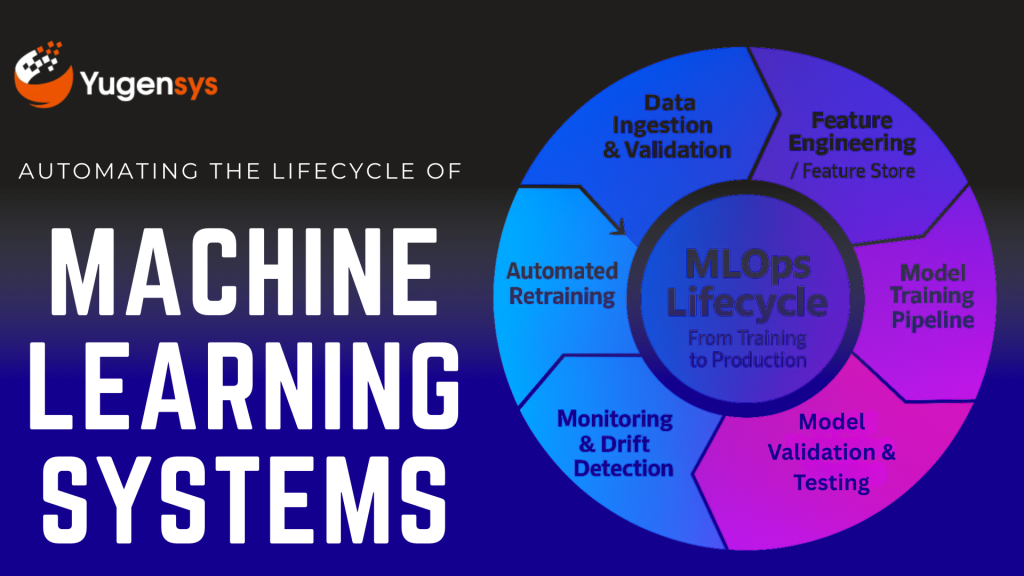
A typical MLOps pipeline includes:
- Data ingestion & validation
- Feature engineering & feature storage
- Training pipelines
- Model validation
- Versioning (data + model + code)
- Automated CI/CD for ML
- Deployments (batch or realtime)
- Monitoring (performance + drift)
- Retraining triggers
Let’s break these down.
3. CI/CD for Machine Learning
Traditional CI/CD doesn’t work for ML because:
- Data changes
- Data quality changes
- Model performance varies
- Training can take hours
- Metrics—not just code—determine correctness
ML CI/CD extends DevOps by adding:
3.1 Continuous Integration for ML (CI)
This includes automated steps like:
- Checking code quality
- Checking data schema
- Running unit tests on data transformations
- Validating training logic
- Running small training jobs to verify pipelines
Tools commonly used:
- GitHub Actions
- Jenkins
- GitLab CI
- Azure Pipelines
- AWS CodePipeline
3.2 Continuous Delivery for ML (CD)
Automatically:
- Validates model performance
- Compares new models vs existing live model
- Pushes approved models to the model registry
- Deploys models to production environments
4. Monitoring in MLOps
Once deployed, a model can fail silently.
Real-world failures include:
- Data Drift: incoming data distribution changes
- Concept Drift: relationship between features & output changes
- Model Skew: training vs production data mismatch
- Feature drift: sudden changes in important variables
- Performance degradation: accuracy drops over time
4.1 What should you monitor?
Type of Monitor | What It Detects |
Prediction metrics | Accuracy, precision, recall, AUC, RMSE |
Data drift | Change in input feature distribution |
Concept drift | Business KPI mismatch (e.g., fraud model missing new fraud patterns) |
Service health | Latency, timeouts, errors |
Feature availability | Broken pipelines, null values, missing features |
4.2 Monitoring Tools
- Evidently AI
- Prometheus + Grafana
- AWS SageMaker Model Monitor
- Feast + custom dashboards
- MLflow monitoring
Monitoring isn’t optional — it prevents silent failures that businesses may discover weeks later.
5. Feature Stores: A Crucial Component
In most ML systems, feature engineering takes 60–80% of the effort.
A Feature Store solves:
- “Where are our features defined?”
- “Are we using the same features in training and production?”
- “How do we share features across teams?”
Benefits of feature stores:
- Centralized and reusable feature definitions
- Prevent duplicate feature work
- Real-time & batch feature serving
- Point-in-time correctness
- Guarantees training-serving parity
Tools include:
- Feast (Open-source)
- AWS SageMaker Feature Store
- Snowflake Feature Store
- Databricks Feature Store
6. Versioning — The Foundation of Reproducibility
Unlike software, ML requires versioning of three elements:
6.1 Code Versioning
- Python scripts
- Notebooks
- Preprocessing logic
- Model architecture
6.2 Data Versioning
- Raw datasets
- Processed datasets
- Training/validation/test splits
Tools: DVC, LakeFS, Delta Lake
6.3 Model Versioning
- Model binaries (pickle, ONNX, TensorFlow SavedModel)
- Model metrics
- Model lineage
- Deployment history
Tools: MLflow, SageMaker Registry, Vertex AI Model Registry
Versioning ensures complete auditability — crucial for compliance-heavy industries.
7. Model Deployment Strategies
There is no single “best” way to deploy models. It depends on:
- Latency requirements
- Data size
- Inference cost
- Real-time vs batch needs
7.1 Batch Deployment
✔ Long processing pipelines
✔ Non-real-time use cases
✔ High-throughput tasks
Examples:
- Nightly demand forecasting
- Monthly credit risk scoring
- Weekly customer segmentation
Infrastructure:
Airflow, AWS Batch, Databricks, Spark
7.2 Real-Time Deployment
✔ Low-latency predictions
✔ User-personalization
✔ Fraud detection
✔ Chatbots, Recommendation engines
Common approaches:
- REST API microservices
- Serverless inference (AWS Lambda / Cloud Functions)
- Managed endpoints (SageMaker / Vertex / Azure ML)
Tech choices:
- FastAPI
- Flask
- TorchServe
- TensorFlow Serving
- Kubernetes + Istio
8. Infrastructure Choices: Containers, Kubernetes, Serverless
8.1 Docker + Containers
- Best for reproducibility
- Lets you package code + dependencies
8.2 Kubernetes (K8s)
Best for:
- High-scale ML systems
- Complex workflows
- Rolling updates
- Auto-scaling
Often paired with:
- Kubeflow
- MLflow
- Argo Workflows
- Seldon
8.3 Serverless Inference
Best for:
- Light-weight models
- Intermittent traffic
- Cost-sensitive teams
Examples:
- AWS Lambda
- Azure Functions
- Cloud Run
9. Automated Retraining Strategies
Models degrade — it’s inevitable.
Retraining triggers can be:
9.1 Time-based retraining
Daily / Weekly / Monthly pipelines
Useful for stable domains (retail, demand forecasting)
9.2 Data-based retraining
Triggered when:
- New dataset arrives
- Feature distributions shift
9.3 Performance-based retraining
Triggered when:
- Accuracy drops below threshold
- Drift exceeds limits
9.4 Human-in-the-loop retraining
Labelers add new examples
Useful for NLP / customer service systems
10. Putting It All Together — A Modern MLOps Architecture
A typical MLOps system includes:
- Data Lake / Warehouse (S3, BigQuery, ADLS)
- ETL Pipeline (Airflow, Glue, dbt)
- Feature Store (Feast / SageMaker FS)
- Experiment Tracking (MLflow / SageMaker Experiments)
- Model Registry
- CI/CD Pipeline (GitHub Actions, Jenkins)
- Deployment Platform (K8s, Serverless, or Managed ML)
- Monitoring + Drift Detection
- Retraining Pipelines
This is the backbone of every AI-driven enterprise.
Conclusion
As organizations scale their AI initiatives, they realize that model building is only 10–20% of the real work. Making AI reliable, measurable, and continuously improving requires:
- Automated pipelines
- Standardized processes
- Scalable infrastructure
- Monitoring
- Collaboration
MLOps transforms machine learning from experiments into real production systems that deliver business impact consistently.
If you’re building or modernizing your AI stack, MLOps is no longer optional — it’s the foundation of any serious, enterprise-grade ML effort.